About Bible for bilingual - 双语圣经
The Bible Multi-Version Comparison is a tool to assist in reading the Bible, allowing you to easily view different versions of the scriptures, compare the differences through comparison, and facilitate the study of the...
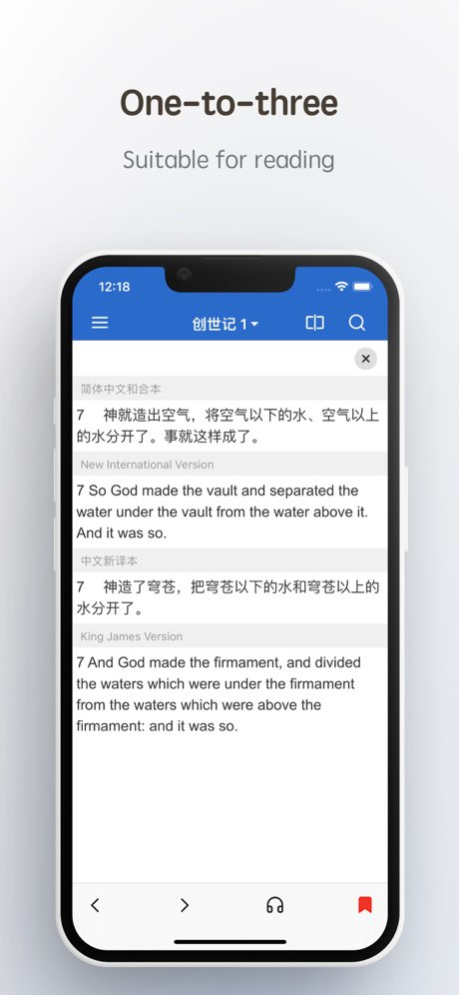
The Bible Multi-Version Comparison is a tool to assist in reading the Bible, allowing you to easily view different versions of the scriptures, compare the differences through comparison, and facilitate the study of the Bible. At the same time, the APP also provides three comparison methods to adapt to various reading scenarios. ## Compare function Provide three comparison methods: one-to-one comparison, one-to-three comparison, menu-type comparison One-to-one comparison: sentence-by-sentence comparison, which is convenient for comparison, and is also a commonly used comparison method One-to-three comparison: You do not need to compare every verse, just swipe right on the verse you want to view to display three different versions of the comparison Menu comparison: support up to 7 versions, click the menu bar to switch between different Bible versions Up to now, more than 30 versions have been supported, and they are still being added, including: Chinese Union Version, New Chinese Version, King James Version (KJV), New International Version (NIV), AMP, Authoritative Standard Version (ASV), New American Standard Version (NASB), English Standard Edition, etc. In addition: French, German, Russian, Japanese, Korean, Greek, Spanish, etc. ## It also has the following functions - Favorites: Swipe left verses to favorite verses, or select verses and click the sharing method to favorite - Search: Quickly find keywords, support book title chapter search, such as: Matt. 19:28; John 3:3,5,7; - Table of Contents: Provides two styles to quickly locate scripture chapters - Offline reading, text language - Dictionary lookup - iCloud data sync - History record, each of your directory operations will be automatically recorded for your convenience - Daily Verse Desktop Component More functions are waiting for your discovery. . . ## User's voice - The layout is clear, simple and practical. Great work, five stars. - It's very easy to use, I've tried several bible apps, and finally this is left on my phone. - I use this software to study English. And I feel that it is helpful to me. - Very useful app! You can compare multiple versions, or search for related verses by word. fast and convenient! - Very good, it is the best Bible app among all the Bible apps I use so far, and I hope to make it better and better! ! - The interface is clean and refreshing, I like it very much, and the search is convenient, and the language conversion is very convenient. Special envoy. Thanks~ . . . If you like this APP, please leave a good comment, this is the greatest support for me, you can contact me if you have any questions or suggestions Email: iapp605+bible@gmail.com Twitter: @FlashSnail
Version History - Fixed an issue with selecting Bible verses 3.2.5 5d ago - Fixed an issue where scrolling on the Home screen could accidentally trigger verse sharing. - Fixed other known issues. 3.2.4 Sep 26 - Fixed known issues 3.2.3 Sep 17 - Fixed an issue where some verses were not fully displayed - Other known issues fixed 3.2.2 Sep 11 - Fixed an issue where some verses were not fully displayed 3.2.1 Apr 30 - Remove advertisements If the Korean directory isn't displaying correctly, please refresh the version selection page by pulling down and try selecting again. (Steps: Click the version comparison icon at the top right of the homepage to enter the comparison settings page, select the comparison version, pull down to refresh the version selection page, and then try selecting Korean again.) 3.2.0 03/31/2025 - Fix the issue where the comparison view does not display in layout mode two on Mac - Favorites support sorting by book title - Adaptation for iOS 17 - Other issue fixes 3.1.4 12/04/2023 New: The comparison page of the second comparison mode supports selecting verses to share and copy Home screen widget optimization 3.1.3 09/28/2022 - Added default options for voice playback - Fixed the problem of being unable to connect to Bluetooth playback 3.1.2 08/14/2022 Fixed the issue that the home widget could not display the verse on August 4th. 3.1.1 08/07/2022 ## NEW - Add Favorites by sharing option, you can favorite multiple verses at a time, and consecutive verses will be automatically merged into one record. And keep the previous left swipe collection scriptures. - The search supports Chinese numbers, such as: 可六3;太十三55. Supports multiple verses at the same time, such as: 徒一14,十二17. ## FIX - The problem of not being able to save scriptures by left swiping on Mac, add a new way to save by sharing - Fixed the issue that the title of the book on the desktop widget could not display the first version 3.1 07/31/2022 In the previous version, the directory was removed and opened by clicking on the title of the navigation bar, which reduced one operation, but some user feedback was difficult to find. This time, it was added back and the entry of the navigation bar was retained. - Support for searching chapters, making it easier to read Bible study materials (eg: "Matt. 19:28; John 3:3,5,7; Titus 3:5") - Other experience optimization 3.0.3 06/11/2022 - Fixed the problem that the prompt could not disappear - Fixed the issue that the voice option could not be selected on iPad 3.0.2 05/27/2022 Fix the voice playing stop in the background 3.0.1 05/16/2022 - All pages optimized, support dark mode - New text-to-speech function - Homepage layout optimization, search, layout switching is more convenient - Favorites support highlighting 3.0 05/15/2022 - Fix Favorite crash on iPad - Other bug fixes 2.10.5 02/22/2021 - Fix the history page crash caused by old data 2.10.4 02/07/2021 - Fix collection crash caused by old data 2.10.3 02/05/2021 - History: you can delete a record individually - Bookmarks, favorites, history records support date classification 2.10.2 02/03/2021 - Fix the problem that the layout comparison method two does not display 2.10.1 11/30/2020 - Verse annotations have been added to some English versions - Data storage code reconstruction, iCloud data synchronization (requires iOS13 or above) - Performance optimization 2.10.0 11/24/2020 - Performance optimization - Fix the crash of individual devices 2.9.8 11/05/2020 - Fix bookmark not available 2.9.7 11/02/2020 【New】 - iOS14 widget (Daily Verse ) - History: Add a clear button, - Setting: add whether to record history switch 【Fix】 - Versions (新標點和合本,神版和上帝版) are not searchable (thanks to Ecare Inc feedback). - Sometimes the layout three menu doesn't roll in sync. - Other Problem Fixes 2.9.6 10/27/2020 - Sharing scripture supports line breaks (line breaks can be controlled on the settings page) - Internationalized English translation - Fix Russian search - Fix redundant Russian verses - Fixed no way to return app after SMS sharing 2.9.5 07/19/2020
Previous Versions
Here you can find the changelog of Bible for bilingual - 双语圣经 since it was posted on our website on 2023-06-23 22:17:25.
The latest version is 3.2.5 and it was updated on 2026-10-12 19:06:40. See below the changes in each version.
Bible for bilingual - 双语圣经 version 3.2.5
Updated At: 2026-10-08
Changes: Version History - Fixed an issue with selecting Bible verses 3.2.5 5d ago - Fixed an issue where scrolling on the Home screen could accidentally trigger verse sharing.
- Fixed other known issues. 3.2.4 Sep 26 - Fixed known issues 3.2.3 Sep 17 - Fixed an issue where some verses were not fully displayed
- Other known issues fixed 3.2.2 Sep 11 - Fixed an issue where some verses were not fully displayed 3.2.1 Apr 30 - Remove advertisements
If the Korean directory isn't displaying correctly, please refresh the version selection page by pulling down and try selecting again.
(Steps: Click the version comparison icon at the top right of the homepage to enter the comparison settings page, select the comparison version, pull down to refresh the version selection page, and then try selecting Korean again.) 3.2.0 03/31/2025 - Fix the issue where the comparison view does not display in layout mode two on Mac
- Favorites support sorting by book title
- Adaptation for iOS 17
- Other issue fixes 3.1.4 12/04/2023 New: The comparison page of the second comparison mode supports selecting verses to share and copy
Home screen widget optimization 3.1.3 09/28/2022 - Added default options for voice playback
- Fixed the problem of being unable to connect to Bluetooth playback 3.1.2 08/14/2022 Fixed the issue that the home widget could not display the verse on August 4th. 3.1.1 08/07/2022 ## NEW
- Add Favorites by sharing option, you can favorite multiple verses at a time, and consecutive verses will be automatically merged into one record. And keep the previous left swipe collection scriptures.
- The search supports Chinese numbers, such as: 可六3;太十三55. Supports multiple verses at the same time, such as: 徒一14,十二17.
## FIX
- The problem of not being able to save scriptures by left swiping on Mac, add a new way to save by sharing
- Fixed the issue that the title of the book on the desktop widget could not display the first version 3.1 07/31/2022 In the previous version, the directory was removed and opened by clicking on the title of the navigation bar, which reduced one operation, but some user feedback was difficult to find. This time, it was added back and the entry of the navigation bar was retained.
- Support for searching chapters, making it easier to read Bible study materials (eg: "Matt. 19:28; John 3:3,5,7; Titus 3:5")
- Other experience optimization 3.0.3 06/11/2022 - Fixed the problem that the prompt could not disappear
- Fixed the issue that the voice option could not be selected on iPad 3.0.2 05/27/2022 Fix the voice playing stop in the background 3.0.1 05/16/2022 - All pages optimized, support dark mode
- New text-to-speech function
- Homepage layout optimization, search, layout switching is more convenient
- Favorites support highlighting 3.0 05/15/2022 - Fix Favorite crash on iPad
- Other bug fixes 2.10.5 02/22/2021 - Fix the history page crash caused by old data 2.10.4 02/07/2021 - Fix collection crash caused by old data 2.10.3 02/05/2021 - History: you can delete a record individually
- Bookmarks, favorites, history records support date classification 2.10.2 02/03/2021 - Fix the problem that the layout comparison method two does not display 2.10.1 11/30/2020 - Verse annotations have been added to some English versions
- Data storage code reconstruction, iCloud data synchronization (requires iOS13 or above)
- Performance optimization 2.10.0 11/24/2020 - Performance optimization
- Fix the crash of individual devices 2.9.8 11/05/2020 - Fix bookmark not available 2.9.7 11/02/2020 【New】
- iOS14 widget (Daily Verse )
- History: Add a clear button,
- Setting: add whether to record history switch
【Fix】
- Versions (新標點和合本,神版和上帝版) are not searchable (thanks to Ecare Inc feedback).
- Sometimes the layout three menu doesn't roll in sync.
- Other Problem Fixes 2.9.6 10/27/2020 - Sharing scripture supports line breaks (line breaks can be controlled on the settings page)
- Internationalized English translation
- Fix Russian search
- Fix redundant Russian verses
- Fixed no way to return app after SMS sharing 2.9.5 07/19/2020
Bible for bilingual - 双语圣经 version 3.2.4
Updated At: 2026-10-01
Changes: Version History - Fixed an issue where scrolling on the Home screen could accidentally trigger verse sharing.
- Fixed other known issues. 3.2.4 4d ago - Fixed known issues 3.2.3 Sep 17 - Fixed an issue where some verses were not fully displayed
- Other known issues fixed 3.2.2 Sep 11 - Fixed an issue where some verses were not fully displayed 3.2.1 Apr 30 - Remove advertisements
If the Korean directory isn't displaying correctly, please refresh the version selection page by pulling down and try selecting again.
(Steps: Click the version comparison icon at the top right of the homepage to enter the comparison settings page, select the comparison version, pull down to refresh the version selection page, and then try selecting Korean again.) 3.2.0 03/31/2025 - Fix the issue where the comparison view does not display in layout mode two on Mac
- Favorites support sorting by book title
- Adaptation for iOS 17
- Other issue fixes 3.1.4 12/04/2023 New: The comparison page of the second comparison mode supports selecting verses to share and copy
Home screen widget optimization 3.1.3 09/28/2022 - Added default options for voice playback
- Fixed the problem of being unable to connect to Bluetooth playback 3.1.2 08/14/2022 Fixed the issue that the home widget could not display the verse on August 4th. 3.1.1 08/07/2022 ## NEW
- Add Favorites by sharing option, you can favorite multiple verses at a time, and consecutive verses will be automatically merged into one record. And keep the previous left swipe collection scriptures.
- The search supports Chinese numbers, such as: 可六3;太十三55. Supports multiple verses at the same time, such as: 徒一14,十二17.
## FIX
- The problem of not being able to save scriptures by left swiping on Mac, add a new way to save by sharing
- Fixed the issue that the title of the book on the desktop widget could not display the first version 3.1 07/31/2022 In the previous version, the directory was removed and opened by clicking on the title of the navigation bar, which reduced one operation, but some user feedback was difficult to find. This time, it was added back and the entry of the navigation bar was retained.
- Support for searching chapters, making it easier to read Bible study materials (eg: "Matt. 19:28; John 3:3,5,7; Titus 3:5")
- Other experience optimization 3.0.3 06/11/2022 - Fixed the problem that the prompt could not disappear
- Fixed the issue that the voice option could not be selected on iPad 3.0.2 05/27/2022 Fix the voice playing stop in the background 3.0.1 05/16/2022 - All pages optimized, support dark mode
- New text-to-speech function
- Homepage layout optimization, search, layout switching is more convenient
- Favorites support highlighting 3.0 05/15/2022 - Fix Favorite crash on iPad
- Other bug fixes 2.10.5 02/22/2021 - Fix the history page crash caused by old data 2.10.4 02/07/2021 - Fix collection crash caused by old data 2.10.3 02/05/2021 - History: you can delete a record individually
- Bookmarks, favorites, history records support date classification 2.10.2 02/03/2021 - Fix the problem that the layout comparison method two does not display 2.10.1 11/30/2020 - Verse annotations have been added to some English versions
- Data storage code reconstruction, iCloud data synchronization (requires iOS13 or above)
- Performance optimization 2.10.0 11/24/2020 - Performance optimization
- Fix the crash of individual devices 2.9.8 11/05/2020 - Fix bookmark not available 2.9.7 11/02/2020 【New】
- iOS14 widget (Daily Verse )
- History: Add a clear button,
- Setting: add whether to record history switch
【Fix】
- Versions (新標點和合本,神版和上帝版) are not searchable (thanks to Ecare Inc feedback).
- Sometimes the layout three menu doesn't roll in sync.
- Other Problem Fixes 2.9.6 10/27/2020 - Sharing scripture supports line breaks (line breaks can be controlled on the settings page)
- Internationalized English translation
- Fix Russian search
- Fix redundant Russian verses
- Fixed no way to return app after SMS sharing 2.9.5 07/19/2020 V2.9.4 更新内容:
- 中文支持空格模糊搜索
- 修复搜索页面搜索后跳回来问题
- 对照模式二下对照页面优化
- 其他一些优化 2.9.4 06/08/2020
Bible for bilingual - 双语圣经 version 3.2.3
Updated At: 2026-09-24
Changes: Version History - Fixed known issues 3.2.3 6d ago - Fixed an issue where some verses were not fully displayed
- Other known issues fixed 3.2.2 Sep 11 - Fixed an issue where some verses were not fully displayed 3.2.1 Apr 30 - Remove advertisements
If the Korean directory isn't displaying correctly, please refresh the version selection page by pulling down and try selecting again.
(Steps: Click the version comparison icon at the top right of the homepage to enter the comparison settings page, select the comparison version, pull down to refresh the version selection page, and then try selecting Korean again.) 3.2.0 03/31/2025 - Fix the issue where the comparison view does not display in layout mode two on Mac
- Favorites support sorting by book title
- Adaptation for iOS 17
- Other issue fixes 3.1.4 12/04/2023 New: The comparison page of the second comparison mode supports selecting verses to share and copy
Home screen widget optimization 3.1.3 09/28/2022 - Added default options for voice playback
- Fixed the problem of being unable to connect to Bluetooth playback 3.1.2 08/14/2022 Fixed the issue that the home widget could not display the verse on August 4th. 3.1.1 08/07/2022 ## NEW
- Add Favorites by sharing option, you can favorite multiple verses at a time, and consecutive verses will be automatically merged into one record. And keep the previous left swipe collection scriptures.
- The search supports Chinese numbers, such as: 可六3;太十三55. Supports multiple verses at the same time, such as: 徒一14,十二17.
## FIX
- The problem of not being able to save scriptures by left swiping on Mac, add a new way to save by sharing
- Fixed the issue that the title of the book on the desktop widget could not display the first version 3.1 07/31/2022 In the previous version, the directory was removed and opened by clicking on the title of the navigation bar, which reduced one operation, but some user feedback was difficult to find. This time, it was added back and the entry of the navigation bar was retained.
- Support for searching chapters, making it easier to read Bible study materials (eg: "Matt. 19:28; John 3:3,5,7; Titus 3:5")
- Other experience optimization 3.0.3 06/11/2022 - Fixed the problem that the prompt could not disappear
- Fixed the issue that the voice option could not be selected on iPad 3.0.2 05/27/2022 Fix the voice playing stop in the background 3.0.1 05/16/2022 - All pages optimized, support dark mode
- New text-to-speech function
- Homepage layout optimization, search, layout switching is more convenient
- Favorites support highlighting 3.0 05/15/2022 - Fix Favorite crash on iPad
- Other bug fixes 2.10.5 02/22/2021 - Fix the history page crash caused by old data 2.10.4 02/07/2021 - Fix collection crash caused by old data 2.10.3 02/05/2021 - History: you can delete a record individually
- Bookmarks, favorites, history records support date classification 2.10.2 02/03/2021 - Fix the problem that the layout comparison method two does not display 2.10.1 11/30/2020 - Verse annotations have been added to some English versions
- Data storage code reconstruction, iCloud data synchronization (requires iOS13 or above)
- Performance optimization 2.10.0 11/24/2020 - Performance optimization
- Fix the crash of individual devices 2.9.8 11/05/2020 - Fix bookmark not available 2.9.7 11/02/2020 【New】
- iOS14 widget (Daily Verse )
- History: Add a clear button,
- Setting: add whether to record history switch
【Fix】
- Versions (新標點和合本,神版和上帝版) are not searchable (thanks to Ecare Inc feedback).
- Sometimes the layout three menu doesn't roll in sync.
- Other Problem Fixes 2.9.6 10/27/2020 - Sharing scripture supports line breaks (line breaks can be controlled on the settings page)
- Internationalized English translation
- Fix Russian search
- Fix redundant Russian verses
- Fixed no way to return app after SMS sharing 2.9.5 07/19/2020 V2.9.4 更新内容:
- 中文支持空格模糊搜索
- 修复搜索页面搜索后跳回来问题
- 对照模式二下对照页面优化
- 其他一些优化 2.9.4 06/08/2020 - 更新第三方组件,提高稳定性
- 搜索页面,下载版本闪退修复
- 其他优化 2.9.3 03/21/2020
Bible for bilingual - 双语圣经 version 3.2.2
Updated At: 2026-09-17
Changes: Version History - Fixed an issue where some verses were not fully displayed
- Other known issues fixed 3.2.2 6d ago - Fixed an issue where some verses were not fully displayed 3.2.1 Apr 30 - Remove advertisements
If the Korean directory isn't displaying correctly, please refresh the version selection page by pulling down and try selecting again.
(Steps: Click the version comparison icon at the top right of the homepage to enter the comparison settings page, select the comparison version, pull down to refresh the version selection page, and then try selecting Korean again.) 3.2.0 03/31/2025 - Fix the issue where the comparison view does not display in layout mode two on Mac
- Favorites support sorting by book title
- Adaptation for iOS 17
- Other issue fixes 3.1.4 12/04/2023 New: The comparison page of the second comparison mode supports selecting verses to share and copy
Home screen widget optimization 3.1.3 09/28/2022 - Added default options for voice playback
- Fixed the problem of being unable to connect to Bluetooth playback 3.1.2 08/14/2022 Fixed the issue that the home widget could not display the verse on August 4th. 3.1.1 08/07/2022 ## NEW
- Add Favorites by sharing option, you can favorite multiple verses at a time, and consecutive verses will be automatically merged into one record. And keep the previous left swipe collection scriptures.
- The search supports Chinese numbers, such as: 可六3;太十三55. Supports multiple verses at the same time, such as: 徒一14,十二17.
## FIX
- The problem of not being able to save scriptures by left swiping on Mac, add a new way to save by sharing
- Fixed the issue that the title of the book on the desktop widget could not display the first version 3.1 07/31/2022 In the previous version, the directory was removed and opened by clicking on the title of the navigation bar, which reduced one operation, but some user feedback was difficult to find. This time, it was added back and the entry of the navigation bar was retained.
- Support for searching chapters, making it easier to read Bible study materials (eg: "Matt. 19:28; John 3:3,5,7; Titus 3:5")
- Other experience optimization 3.0.3 06/11/2022 - Fixed the problem that the prompt could not disappear
- Fixed the issue that the voice option could not be selected on iPad 3.0.2 05/27/2022 Fix the voice playing stop in the background 3.0.1 05/16/2022 - All pages optimized, support dark mode
- New text-to-speech function
- Homepage layout optimization, search, layout switching is more convenient
- Favorites support highlighting 3.0 05/15/2022 - Fix Favorite crash on iPad
- Other bug fixes 2.10.5 02/22/2021 - Fix the history page crash caused by old data 2.10.4 02/07/2021 - Fix collection crash caused by old data 2.10.3 02/05/2021 - History: you can delete a record individually
- Bookmarks, favorites, history records support date classification 2.10.2 02/03/2021 - Fix the problem that the layout comparison method two does not display 2.10.1 11/30/2020 - Verse annotations have been added to some English versions
- Data storage code reconstruction, iCloud data synchronization (requires iOS13 or above)
- Performance optimization 2.10.0 11/24/2020 - Performance optimization
- Fix the crash of individual devices 2.9.8 11/05/2020 - Fix bookmark not available 2.9.7 11/02/2020 【New】
- iOS14 widget (Daily Verse )
- History: Add a clear button,
- Setting: add whether to record history switch
【Fix】
- Versions (新標點和合本,神版和上帝版) are not searchable (thanks to Ecare Inc feedback).
- Sometimes the layout three menu doesn't roll in sync.
- Other Problem Fixes 2.9.6 10/27/2020 - Sharing scripture supports line breaks (line breaks can be controlled on the settings page)
- Internationalized English translation
- Fix Russian search
- Fix redundant Russian verses
- Fixed no way to return app after SMS sharing 2.9.5 07/19/2020 V2.9.4 更新内容:
- 中文支持空格模糊搜索
- 修复搜索页面搜索后跳回来问题
- 对照模式二下对照页面优化
- 其他一些优化 2.9.4 06/08/2020 - 更新第三方组件,提高稳定性
- 搜索页面,下载版本闪退修复
- 其他优化 2.9.3 03/21/2020 搜索:
- 支持多个关键字搜索
- 支持直接切换版本搜索,无需再次点击搜索按钮
- 支持菜单版本缩写显示
其他优化 2.9.2 03/16/2020
Bible for bilingual - 双语圣经 version 3.2.1
Updated At: 2026-09-10
Changes: Version History - Fixed an issue where some verses were not fully displayed 3.2.1 Apr 30 - Remove advertisements
If the Korean directory isn't displaying correctly, please refresh the version selection page by pulling down and try selecting again.
(Steps: Click the version comparison icon at the top right of the homepage to enter the comparison settings page, select the comparison version, pull down to refresh the version selection page, and then try selecting Korean again.) 3.2.0 03/31/2025 - Fix the issue where the comparison view does not display in layout mode two on Mac
- Favorites support sorting by book title
- Adaptation for iOS 17
- Other issue fixes 3.1.4 12/04/2023 New: The comparison page of the second comparison mode supports selecting verses to share and copy
Home screen widget optimization 3.1.3 09/28/2022 - Added default options for voice playback
- Fixed the problem of being unable to connect to Bluetooth playback 3.1.2 08/14/2022 Fixed the issue that the home widget could not display the verse on August 4th. 3.1.1 08/07/2022 ## NEW
- Add Favorites by sharing option, you can favorite multiple verses at a time, and consecutive verses will be automatically merged into one record. And keep the previous left swipe collection scriptures.
- The search supports Chinese numbers, such as: 可六3;太十三55. Supports multiple verses at the same time, such as: 徒一14,十二17.
## FIX
- The problem of not being able to save scriptures by left swiping on Mac, add a new way to save by sharing
- Fixed the issue that the title of the book on the desktop widget could not display the first version 3.1 07/31/2022 In the previous version, the directory was removed and opened by clicking on the title of the navigation bar, which reduced one operation, but some user feedback was difficult to find. This time, it was added back and the entry of the navigation bar was retained.
- Support for searching chapters, making it easier to read Bible study materials (eg: "Matt. 19:28; John 3:3,5,7; Titus 3:5")
- Other experience optimization 3.0.3 06/11/2022 - Fixed the problem that the prompt could not disappear
- Fixed the issue that the voice option could not be selected on iPad 3.0.2 05/27/2022 Fix the voice playing stop in the background 3.0.1 05/16/2022 - All pages optimized, support dark mode
- New text-to-speech function
- Homepage layout optimization, search, layout switching is more convenient
- Favorites support highlighting 3.0 05/15/2022 - Fix Favorite crash on iPad
- Other bug fixes 2.10.5 02/22/2021 - Fix the history page crash caused by old data 2.10.4 02/07/2021 - Fix collection crash caused by old data 2.10.3 02/05/2021 - History: you can delete a record individually
- Bookmarks, favorites, history records support date classification 2.10.2 02/03/2021 - Fix the problem that the layout comparison method two does not display 2.10.1 11/30/2020 - Verse annotations have been added to some English versions
- Data storage code reconstruction, iCloud data synchronization (requires iOS13 or above)
- Performance optimization 2.10.0 11/24/2020 - Performance optimization
- Fix the crash of individual devices 2.9.8 11/05/2020 - Fix bookmark not available 2.9.7 11/02/2020 【New】
- iOS14 widget (Daily Verse )
- History: Add a clear button,
- Setting: add whether to record history switch
【Fix】
- Versions (新標點和合本,神版和上帝版) are not searchable (thanks to Ecare Inc feedback).
- Sometimes the layout three menu doesn't roll in sync.
- Other Problem Fixes 2.9.6 10/27/2020 - Sharing scripture supports line breaks (line breaks can be controlled on the settings page)
- Internationalized English translation
- Fix Russian search
- Fix redundant Russian verses
- Fixed no way to return app after SMS sharing 2.9.5 07/19/2020 V2.9.4 更新内容:
- 中文支持空格模糊搜索
- 修复搜索页面搜索后跳回来问题
- 对照模式二下对照页面优化
- 其他一些优化 2.9.4 06/08/2020 - 更新第三方组件,提高稳定性
- 搜索页面,下载版本闪退修复
- 其他优化 2.9.3 03/21/2020 搜索:
- 支持多个关键字搜索
- 支持直接切换版本搜索,无需再次点击搜索按钮
- 支持菜单版本缩写显示
其他优化 2.9.2 03/16/2020 修复 iOS 13 无法分享,查单词等问题 2.9.1 03/01/2020
Bible for bilingual - 双语圣经 version 3.2.0
Updated At: 2025-03-31
Changes: - Remove advertisements
If the Korean directory isn't displaying correctly, please refresh the version selection page by pulling down and try selecting again.
(Steps: Click the version comparison icon at the top right of the homepage to enter the comparison settings page, select the comparison version, pull down to refresh the version selection page, and then try selecting Korean again.)
Bible for bilingual - 双语圣经 version 3.2.0
Updated At: 2025-03-31
Changes: Mar 31, 2025
Version 3.2.0
- Remove advertisements
If the Korean directory isn't displaying correctly, please refresh the version selection page by pulling down and try selecting again.
(Steps: Click the version comparison icon at the top right of the homepage to enter the comparison settings page, select the comparison version, pull down to refresh the version selection page, and then try selecting Korean again.)
Bible for bilingual - 双语圣经 version 3.1.4
Updated At: 2023-12-04
Changes: Dec 4, 2023
Version 3.1.4
- Fix the issue where the comparison view does not display in layout mode two on Mac
- Favorites support sorting by book title
- Adaptation for iOS 17
- Other issue fixes
Bible for bilingual - 双语圣经 version 3.1.3
Updated At: 2022-09-28
Changes: Sep 28, 2022
Version 3.1.3
New: The comparison page of the second comparison mode supports selecting verses to share and copy
Home screen widget optimization
Disclaimer
Official App Store Link
We do not host Bible for bilingual - 双语圣经 on our servers. We did not scan it for viruses, adware, spyware or other type of malware. This app is hosted by Apple and passed their terms and conditions to be listed there. We recommend caution when installing it.
The App Store link for Bible for bilingual - 双语圣经 is provided to you by apps112.com without any warranties, representations or guarantees of any kind, so access it at your own risk.
If you have questions regarding this particular app contact the publisher directly. For questions about the functionalities of apps112.com contact us.